Hong Kong incorporation fee & Aspire
 cashback.


Table of Contents
Accurate financial management is fundamental to every small enterprise, and the right tools can significantly improve efficiency and decision-making.
Traditional manual bookkeeping is gradually being replaced by digital solutions, with modern small business accounting software offering automated processes, real-time insights, and greater accuracy than paper-based systems. Cloud-enabled platforms have further accelerated this shift by allowing businesses to access data from anywhere, integrate operations, and maintain consistent control over their financial records.
This guide provides a comprehensive comparison of leading accounting software Singapore options and other global systems commonly adopted by SMEs. By examining key features, pricing, scalability, and integration capabilities, the article helps business owners identify the most suitable bookkeeping software and build an accounting system that supports compliance, transparency, and sustainable growth.
Key takeaway:
- Modern small business accounting software enhances accuracy and operational efficiency by automating bookkeeping, enabling real-time insights, and reducing manual errors associated with traditional paper-based systems.
- Cloud-based accounting software has become the dominant model for most SMEs due to its accessibility, scalability, automatic updates, and seamless integration with banking, payroll, and business applications.
- Desktop accounting software remains relevant for specific use cases, particularly for businesses requiring offline access, full data ownership, or strict internal security controls.
- Successful implementation requires proper configuration, staff training, and strong security practices, ensuring that the accounting system supports compliance with Singapore’s tax, reporting, and data protection regulations.
- BBCIncorp provides end-to-end corporate accounting solutions, helping SMEs choose, configure, and integrate the right software while maintaining business compliance and supporting long-term growth.
Why small businesses need accounting software
Managing finances effectively is one of the most critical aspects of running a small business. From daily transactions to payroll and tax reporting, every process requires accuracy and consistency. Manual bookkeeping often limits business growth because it relies heavily on time-consuming data entry and manual calculations that can easily lead to mistakes.
Modern accounting systems and bookkeeping software have become essential tools for small businesses seeking transparency and control. By digitalizing financial processes, business owners gain instant access to insights that help them plan budgets, monitor performance, and comply with regulations without the overhead of hiring a full-time accountant. The shift to automated accounting also allows companies to allocate resources more efficiently and focus on strategic priorities such as growth and innovation.
Challenges of manual bookkeeping for small businesses
Manual bookkeeping presents several challenges that hinder efficiency and accuracy:
- Inaccuracy and time consumption: Data entry errors are common when recording transactions manually, and reconciling accounts takes significant time.
- Difficulty in generating reports and tracking cash flow: Without automated systems, producing detailed reports or real-time cash flow statements requires extensive manual work.
- Risk of data loss and compliance errors: Paper-based records or offline spreadsheets can be easily lost or corrupted, making it difficult to meet tax and audit requirements.
These issues often compound as the business expands, creating financial blind spots that impact decision-making and compliance.
Key benefits of using accounting software
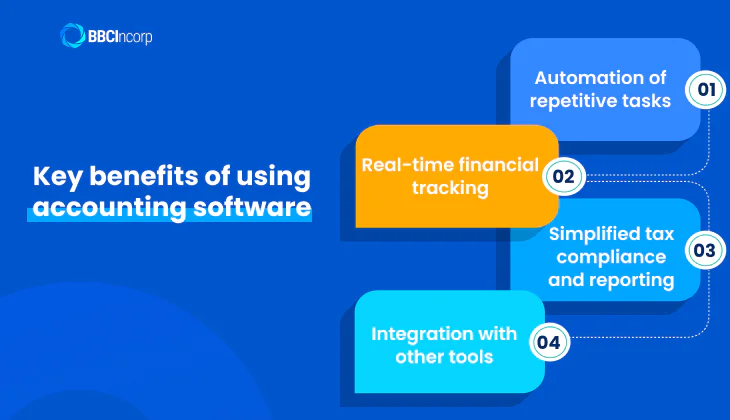
Adopting an easy accounting software for a small business provides measurable advantages over manual methods:
- Automation of repetitive tasks: Invoicing, reconciliation, and payroll are automatically processed, reducing administrative workload.
- Real-time financial tracking: With cloud-based accounting software, owners can access up-to-date financial information anytime, improving responsiveness.
- Simplified tax compliance and reporting: Integrated tax modules help generate accurate statements and ensure timely submissions.
- Integration with other tools: Modern accounting systems connect seamlessly with POS, banking, and CRM tools, creating a unified financial ecosystem.
Overall, accounting software streamlines financial management, enhances accuracy, and supports long-term sustainability for small businesses.
Cloud-based accounting software and its advantages
In today’s digital economy, cloud-based accounting software has become the preferred choice for small businesses seeking flexibility, collaboration, and real-time control. Unlike traditional on-premise systems, cloud-based accounting software operates entirely online, allowing users to access financial data anytime and from any device. This shift only enhances efficiency but also supports hybrid and remote work environments that are now common in modern businesses.
Benefits of cloud accounting
Cloud accounting provides a range of advantages that traditional systems cannot match:
- Real-time access from anywhere: Owners and accountants can log in remotely to review invoices, update transactions, or generate reports instantly, enabling faster financial decisions.
- Secure data storage and automatic updates: Reputable cloud providers host data on encrypted servers with multi-layer security, although businesses must still manage access controls and internal security practices. Automatic updates ensure the accounting system stays compliant with the latest tax regulations without manual installation.
- Scalability for business growth: As your business expands, cloud-based accounting software allows easy upgrades in storage, users, and features without disrupting daily operations.
Security and data protection in the cloud
While accessibility is a key strength of cloud-based account software, data security remains its most critical feature. Reputable cloud vendors use advanced encryption protocols that protect sensitive financial information both in transit and at rest.
In addition, customizable user permissions allow business owners to control who can view or edit specific data, reducing the risk of unauthorized access. Most providers also implement automatic backup and recovery systems, ensuring that data can be quickly restored in case of hardware failure or cyber incidents.
With these safeguards, cloud accounting not only enhances convenience but also reinforces data integrity and compliance, giving businesses confidence that their financial information is secure.
Desktop accounting software and its relevance
Although cloud computing dominates today’s financial management landscape, desktop accounting software remains a relevant choice for certain businesses. Many small enterprises, government contractors, and firms with sensitive data still rely on local installations to maintain operational continuity and regulatory compliance. Unlike subscription-based cloud tools, desktop systems provide ownership, independence, and offline functionality that some organizations find indispensable.
Benefits of desktop accounting software
Despite limited flexibility compared to cloud solutions, desktop-based systems offer tangible advantages that continue to appeal to niche business segments.
Key benefits include:
- Works without internet connection: An offline accounting system allows uninterrupted access even in remote areas or during network disruptions, ensuring business continuity.
- One-time purchase and full ownership: Companies retain indefinite access without recurring subscription fees, making long-term use cost-effective.
- Better control over data storage and privacy: Financial records are stored within the company’s internal servers, providing full control over access and security protocols.
- Stable performance for local or small-scale operations: With fewer dependencies on third-party servers, desktop platforms often run faster and more predictably on local hardware.
This model is particularly preferred by firms operating in regions with weak connectivity or those handling confidential information, such as legal, healthcare, or defense contractors.
Security and maintenance responsibilities
A major distinction between cloud and desktop accounting systems lies in data protection and maintenance accountability. With desktop software, data is stored locally, requiring users to implement their own accounting security system and manual backup routines.
Users must also install updates, patches, and new tax modules independently, which can become time-consuming. Failure to perform regular backups exposes businesses to risks of data loss due to hardware malfunction, theft, or cyberattacks targeting local systems.
Although this model offers greater data autonomy, it demands stronger internal IT capability and disciplined maintenance practices to remain secure and compliant over time.
While the rise of cloud platforms has transformed financial management, desktop accounting software continues to hold significance for companies prioritizing full data control, cost ownership, and offline reliability.
Comparison: Cloud-Based vs. Desktop Accounting Software
As small businesses grow and digitize their operations, one key decision remains: whether to adopt a cloud-based accounting software or stick with a desktop accounting system.
Both models aim to simplify financial management but differ greatly in flexibility, cost structure, and data control. Cloud solutions dominate today’s market for their scalability and accessibility, while desktop systems still attract companies needing tighter on-site control or offline functionality.
The comparison below outlines how each model performs across essential business criteria.
| Category | Cloud-Based Accounting Software | Desktop Accounting Software |
| Accessibility | Accessible anytime, anywhere via the internet; ideal for remote teams and multi-branch operations. | Limited to the device where software is installed; remote access requires additional setup. |
| Cost Structure | Usually subscription-based (monthly/annual); lower upfront costs but recurring fees. | One-time purchase with optional paid updates; higher initial cost but no recurring subscription. |
| Updates & Maintenance | Automatic updates managed by the vendor, ensuring compliance and new features. | Manual updates required; risk of outdated versions if maintenance lapses. |
| Data Security | Data is encrypted and stored on secure servers with backup and disaster recovery. | Full local data control but higher risk of data loss if backup is not properly managed. |
| Scalability | Easily scalable with added users, features, or integrations; suitable for fast-growing SMEs. | Limited scalability; may require hardware upgrades for more storage or users. |
| Collaboration | Supports multi-user access and real-time collaboration between accountants and business owners. | Collaboration is restricted; users must share files manually or through local networks. |
| Compliance & Integration | Frequently updated to meet tax and reporting standards; integrates with banks and apps. | Requires manual configuration for compliance updates; fewer third-party integrations. |
| Offline Availability | Requires a stable internet connection; limited functionality offline. | Fully functional offline; suitable for businesses with poor internet connectivity. |
| Long-Term Viability | Growing trend supported by continuous vendor innovation and global adoption. | Support is gradually declining, although some industries still rely on on-premise solutions. |
While both systems can support accurate bookkeeping, cloud-based solutions are now the default for most SMEs due to their flexibility, automation, and compliance advantages. Desktop software still suits firms with strict internal data policies or limited internet access, but the balance is clearly shifting toward the cloud.
For long-term efficiency, integration, and security, embracing cloud-based accounting software positions a business to scale seamlessly in an increasingly digital economy.
How to choose the best accounting software
Choosing the right accounting solution is a strategic decision that influences how efficiently a business operates. The ideal platform should simplify bookkeeping, improve compliance, and scale with growth. For small enterprises in Singapore, this decision carries even more weight because the software must align with local tax requirements set by ACRA and IRAS while supporting regional needs like multi-currency transactions.
The best accounting software is not always the most expensive but the one that fits your business structure, size, and future plans. Understanding key features and evaluating compatibility with your existing workflow are essential before making an investment.
Essential features to look for
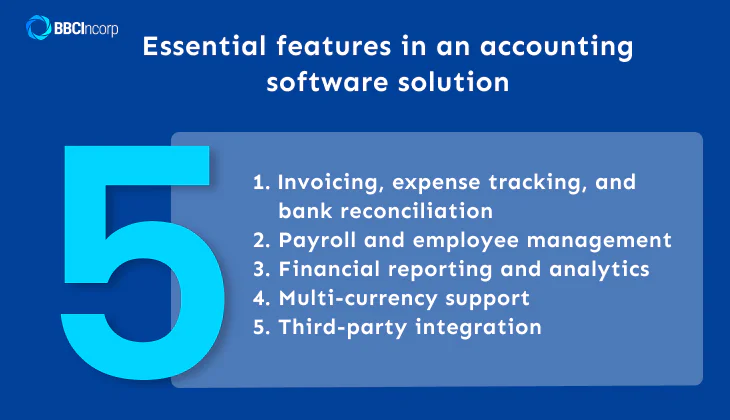
When comparing options for the best accounting tool for small businesses, look for software that combines accuracy, usability, and adaptability:
- Invoicing, expense tracking, and bank reconciliation: These core functions automate transaction management, helping you maintain accurate cash flow records and reduce administrative work.
- Payroll and employee management: Integrated payroll ensures that salary calculations, deductions, and tax filings are consistent and compliant with local employment laws.
- Financial reporting and analytics: Dashboards and analytics tools allow business owners to evaluate performance and identify cost-saving opportunities.
- Multi-currency support: For Singapore-based businesses that deal with international partners, this feature ensures smooth foreign currency conversion and accurate reporting.
- Third-party integration: The ability to connect seamlessly with external applications such as POS systems, CRMs, and banking platforms enhances efficiency and minimizes duplicate data entry.
A strong accounting tool provides a single system of record that minimizes human error and delivers reliable insights for decision-making.
Factors to consider before purchasing
Besides features, businesses should also evaluate their internal structure and long-term growth plans before deciding on an accounting platform. The right choice depends on how the software aligns with your operational model and scalability goals.
- Size and complexity of your business: Small firms may only need basic invoicing and reconciliation, while expanding enterprises often require automation, advanced reporting, and multi-user access.
- Industry-specific requirements: A retail company might prioritize POS integration, while a professional services firm could benefit from time-tracking and project-based billing.
- Cloud vs on-premise options: Cloud-based software offers flexibility and remote accessibility, making it ideal for businesses with distributed teams. On-premise systems, on the other hand, provide more direct control over data security and customization.
- Budget and subscription model: When comparing accounting software Singapore prices, consider how vendors charge. Some use per-user monthly fees, while others offer scalable packages. Subscription-based pricing generally delivers the best commercial software experience with predictable costs and regular feature updates.
Evaluating these factors ensures that the chosen accounting system remains efficient, compliant, and adaptable to future business expansion.
Top accounting software for small businesses
Selecting the right small business accounting software can transform how a company manages its finances. With numerous cloud-based accounting software options available today, small enterprises can find solutions tailored to their scale, budget, and compliance needs. Below are seven of the most trusted accounting tools, each serving a different business profile and operational goal.
QuickBooks Online
QuickBooks Online continues to dominate as a trusted cloud-based accounting software for SMEs worldwide. Its strength lies in offering a unified platform that manages everything from payroll to inventory while presenting clear dashboards for strategic insight.
Key advantages of QuickBooks include:
- Comprehensive coverage of expense tracking, payroll, invoicing, and reporting.
- Real-time dashboards with automated financial summaries.
- Strong integration with banks and business applications.
- Mobile accessibility for owners and accountants on the move.
Pricing typically starts from entry-level monthly plans and scales based on features and users. As the company grows, costs can rise, but for established SMEs prioritizing reliability and depth, QuickBooks remains a benchmark for efficiency and control.
Xero
Xero has earned its place as one of the most reliable accounting software Singapore options thanks to its clean interface and seamless banking integration. It’s especially favored by startups and expanding SMEs seeking clarity and collaborative accounting.
Why businesses choose Xero:
- Automated bank reconciliation with major Singapore banks.
- Over 800 app integrations through the Xero App Store.
- Customizable dashboards offering real-time insights.
- Efficient invoicing and expense claim management for everyday users.
Some advanced functions, such as payroll, may require separate subscriptions, but Xero’s intuitive design and collaboration tools make it ideal for founders and teams that value simplicity and transparency.
Zoho Books
Zoho Books stands out among the best accounting software options for freelancers, startups, and small enterprises that value affordability without losing functionality. It’s part of the wider Zoho ecosystem, which connects accounting to CRM, inventory, and project management.
Main benefits of Zoho Books:
- Competitive pricing, including a free tier for microbusinesses.
- Smooth integration with other Zoho products for unified operations.
- Automation of invoicing, recurring billing, and expense tracking.
- Multi-currency support and customizable tax settings for global businesses.
While reporting features are less advanced than those of premium tools, Zoho Books offers one of the best balances between cost, performance, and scalability, making it an easy accounting software for small business owners.
Sage Business Cloud Accounting
Sage Business Cloud Accounting appeals to business owners who prioritize structure and control in their financial management. It combines automation and forecasting with strong compliance support, delivering a secure cloud-based account software experience.
Notable features of Sage Accounting:
- Multi-user collaboration for finance teams and auditors.
- Real-time dashboards for financial forecasting and analysis.
- Automated bank reconciliation and invoice processing.
- Role-based permissions and customizable reports.
Its setup may feel complex at first, but Sage is ideal for professional service firms that need precision, accountability, and reliable oversight of multiple clients or departments.
FreshBooks
FreshBooks is one of the best accounting tools for small business owners working in project-based or service-oriented industries. It merges time tracking, billing, and expense management into a single platform designed for simplicity and accuracy.
Features that make FreshBooks stand out:
- Automated invoicing and recurring payment scheduling.
- Built-in time tracking linked to client projects.
- Expense and receipt management for clean record-keeping.
- Mobile dashboard for instant visibility across devices.
Although it lacks full inventory and payroll modules, FreshBooks remains an efficient bookkeeping software solution for freelancers, consultants, and agencies that bill clients frequently or manage multiple projects simultaneously.
Wave Accounting
Wave continues to be the go-to free accounting software for microbusinesses and freelancers who need essential accounting features without monthly fees. Its simplicity makes it a practical stepping stone toward digital finance.
Why small enterprises rely on Wave:
- Completely free core tools for invoicing, accounting, and reports.
- Straightforward setup ideal for beginners.
- Cloud storage with automatic backup and access from any device.
- Optional paid add-ons for payment and payroll processing.
Wave’s biggest limitation is scalability, as larger businesses may quickly outgrow its basic features. Nevertheless, it provides a reliable entry point for entrepreneurs moving from spreadsheets to cloud-based financial management.
YOB and AutoCount (Singapore-based solutions)
For Singapore-focused companies, YOB and AutoCount are leading accounting software Singapore providers tailored to meet IRAS and ACRA compliance, including GST reporting, XBRL filing requirements, and statutory record-keeping obligations. These systems blend local accounting requirements with practical deployment options.
Their main strengths include:
- GST-ready modules and e-invoicing aligned with IRAS frameworks.
- On-premise or hybrid installation for enhanced data control.
- Built-in tax calculation and automated local reporting templates.
- Responsive bilingual customer support for Singapore users.
Their interfaces may look less modern than global platforms, but for firms that value local compliance and IRAS integration, they provide dependable and cost-effective solutions.
Accounting software has evolved from simple bookkeeping tools into full-fledged financial management systems. Today’s cloud-based accounting software allows small businesses to automate tasks, connect directly with banks, and ensure compliance across jurisdictions, all while saving time and reducing costs.
Whether a company needs scalability, affordability, or local compliance, there’s now a purpose-built solution available. The right choice will not only streamline operations but also turn financial data into strategic insight, empowering business owners to focus on growth instead of paperwork.
Implementation and Training
Implementing a new accounting system involves more than installing the software. For small businesses, the transition requires careful planning to ensure that financial data is migrated correctly, configurations align with operational workflows, and employees are trained to use the system efficiently. A structured implementation process minimises disruption and allows the organisation to realise the full value of its accounting investment.
Configuring and Setting Up the Software
Proper configuration is essential to ensure accuracy and compliance. Businesses must define the chart of accounts, tax settings, financial year structure, and user permission levels before the system goes live.
Integrations with banking platforms, POS systems, or inventory management tools should also be established early to prevent inconsistent data flows. Cloud-based systems often provide automated setup wizards, but desktop platforms may require manual configuration or support from accounting professionals. A well-configured system reduces future errors and supports smooth reporting and reconciliation.
Training Employees to Use the System
Even the best accounting software cannot deliver value without capable users. Training should cover core functions such as recording transactions, generating reports, processing payroll, and managing approvals. For cloud platforms, additional guidance on user roles, remote access, and collaborative features is often necessary.
Small businesses benefit from short, role-specific training sessions that match each employee’s responsibilities. Ongoing training ensures that staff remain proficient as new features are introduced or workflows are updated.
Resolving Common Setup and Usage Issues
During the initial implementation phase, businesses may encounter challenges such as duplicate entries, integration failures, incorrect tax mappings, or permission restrictions that block workflow. Establishing a clear internal escalation process and documenting common troubleshooting steps helps maintain consistency.
Many providers offer support portals, live chat, or dedicated onboarding teams to assist with setup issues. Addressing these challenges promptly ensures accurate financial data and prevents operational bottlenecks.
Security and Compliance in Accounting Software
Security remains one of the most critical considerations when adopting any accounting system. Because financial data contains sensitive information about revenues, payroll, client details, and tax records, businesses must ensure that their chosen platform incorporates robust protection mechanisms.
At the same time, compliance with local regulations is essential to avoid penalties, maintain audit readiness, and uphold corporate governance standards. Modern accounting solutions integrate both elements by combining strong technical safeguards with regulatory frameworks aligned to jurisdictional requirements.
Protecting Data with Encryption and Access Controls
Effective security begins with ensuring that data is protected both during transmission and storage. Most reputable accounting platforms apply multi-layer encryption protocols to secure financial information from unauthorised access. Encryption makes data unreadable to intruders, reducing exposure during network transfers or if a breach occurs.
Equally important are access controls, which govern who can view, edit, approve, or export data within the system. Role-based permissions allow businesses to limit access based on job responsibilities, thereby preventing accidental changes, internal misuse, or fraud. Audit trails and activity logs further enhance transparency by recording every action taken within the software. These features are essential to maintaining the integrity of financial records and supporting internal controls.
Ensuring Compliance with Local Laws and Regulations
Beyond security, accounting software must comply with the legal and regulatory frameworks of the jurisdiction in which the business operates. For Singapore, this typically includes alignment with IRAS tax rules, GST requirements, XBRL reporting standards, and record-keeping obligations under the Companies Act. Cloud-based platforms often release automatic updates to reflect regulatory changes, ensuring that businesses remain compliant without manual adjustments.
Compliance also extends to data protection laws such as the Personal Data Protection Act (PDPA), which governs how personal and financial information must be handled. Systems that support secure data retention, controlled access, and transparent audit logs help businesses meet these obligations. By combining regulatory alignment with strong security architecture, accounting software enables companies to maintain accuracy, transparency, and legal compliance throughout their financial operations.
BBCIncorp Accounting Solutions for Small Businesses in Singapore
Choosing the right accounting system is only one part of building a strong financial foundation. Small businesses also need reliable partners to ensure accurate reporting, proper compliance, and seamless integration between their accounting tools and day-to-day operations. BBCIncorp supports SMEs in Singapore with a comprehensive suite of corporate accounting solutions, enabling business owners to maintain transparency, meet statutory obligations, and optimize financial processes.
Our approach combines regulatory expertise with practical implementation support, helping clients adopt suitable accounting software Singapore options while maintaining alignment with IRAS, ACRA, and Companies Act requirements.
Integrated Business Setup and Accounting Solutions
BBCIncorp provides end-to-end support that extends far beyond traditional bookkeeping software assistance. We help clients set up their core business functions, starting from company incorporation and corporate secretarial services to ongoing accounting, tax filing, and annual compliance management.
For small and medium-sized enterprises operating in Singapore or expanding into global markets, our team delivers tailored accounting workflows that match each client’s structure, industry, and operational scale. Whether a business requires basic bookkeeping, cloud accounting migration, XBRL preparation, or consolidated reporting across multiple jurisdictions, BBCIncorp ensures that every financial process is configured correctly and remains compliant.
Why Choose BBCIncorp for Accounting Solutions in Singapore
BBCIncorp’s strength lies in the combination of local compliance expertise and hands-on experience implementing leading accounting platforms. Our team understands how Singapore’s tax rules, GST regulations, and reporting obligations influence system setup and daily accounting workflows. This allows us to guide small businesses toward tools that enhance automation, minimise manual entries, and improve reporting accuracy.
SMEs choose to work with BBCIncorp because we offer a combination of regulatory expertise, practical system implementation, and dedicated support that strengthens their overall accounting environment.
- Extensive experience with IRAS, ACRA, and Companies Act requirements.
- Ability to configure accounting software to support automated invoices, bank feeds, payroll, and real-time reporting.
- Dedicated advisory support for migration from manual or desktop systems to cloud platforms.
- Practical guidance on structuring charts of accounts, permissions, and workflows to ensure accuracy and control.
- Seamless integration of accounting tools with business applications such as banking, POS, CRM, or inventory systems.
Small businesses benefit from structured implementation support that ensures smooth onboarding, proper data migration, and ongoing compliance monitoring. By aligning software capabilities with regulatory standards, BBCIncorp helps SMEs build a future-ready accounting environment that supports efficiency, transparency, and long-term business compliance.
Conclusion
Adopting the right small business accounting software is essential for organisations seeking accuracy, efficiency, and long-term scalability. Modern cloud-based accounting software enables real-time access, automated reporting, and seamless collaboration, allowing small businesses to streamline financial processes and remain compliant with tax and regulatory requirements.
As companies continue to grow and operate across multiple markets, selecting suitable accounting software becomes a strategic decision that supports clearer insights and stronger financial control. For businesses that require guidance in evaluating, implementing, or integrating the most suitable systems, BBCIncorp offers professional support designed to align technology with compliance and operational needs.
To receive tailored advice on choosing the right accounting system for your business, you may contact our team directly at service@bbcincorp.com. With the right tools and expert assistance, small businesses can build a financial framework that supports sustainable growth and confident decision-making.
Frequently Asked Questions
What features should small business accounting software include?
Effective small business accounting software should provide expense tracking, invoicing and billing functions, automated bank reconciliation, and built-in compliance tools. These features help maintain accurate records, support cash-flow monitoring, and ensure the business remains prepared for tax reporting and regulatory obligations.
Why choose cloud-based accounting software for a small business?
A cloud-based accounting software offers real-time access from any location, supports teamwork through shared dashboards, and receives automatic updates without manual installation. It also reduces upfront costs compared to desktop systems and often includes mobile applications for managing finances on the move.
How important is scalability in an accounting system?
Scalability is a critical factor because accounting needs evolve as a business grows. An adaptable system should accommodate additional users, advanced functions such as inventory management or multi-entity consolidation, and wider integrations. A scalable platform enables expansion without requiring a complete system replacement.
What are the main steps to set up accounting software?
The setup process typically includes configuring company information, defining the chart of accounts, setting tax rates, linking bank accounts, migrating historical transactions, integrating supporting tools such as POS or CRM, and training employees. Completing these steps ensures accurate reporting and a smooth transition into the new system.
Disclaimer: While BBCIncorp strives to make the information on this website as timely and accurate as possible, the information itself is for reference purposes only. You should not substitute the information provided in this article for competent legal advice. Feel free to contact BBCIncorp’s customer services for advice on your specific cases.
Industry News & Insights
Get helpful tips and info from our newsletter!
Stay in the know and be empowered with our strategic how-tos, resources, and guidelines.